WordPress Ecosystem & Operations
Security hardening, performance, DPDP compliance, backups, and Next.js migrations.
# Technical Manual: WordPress Ecosystem & Operations Playbook
This playbook documents the critical parameters, essential configurations, low-cost plugin stack, and operational standards required to run a secure, fast, compliant, and reliable WordPress website — from day one through long-term maintenance.
> The reality: An unmanaged WordPress site becomes a liability within 30–60 days of launch. 90,000+ WordPress sites are attacked every minute. This playbook defines the non-negotiable baseline every production WordPress installation must meet.
1. The Critical Parameter Checklist
Before anything else, every WordPress installation must pass these mandatory baseline checks:
| Parameter | Status Target | Why It's Non-Negotiable |
|---|---|---|
| PHP Version | 8.2+ (never below 8.2) | PHP 8.0 EOL: Nov 2023. PHP 8.1 EOL: Nov 2025. As of 2026, 8.2 is the minimum supported version. |
| WordPress Core | Latest stable release | Core updates patch active CVEs within 24 hours of disclosure |
| SSL/HTTPS | A rating (A+ target) on SSL Labs | A+ requires HSTS preload + perfect forward secrecy — practical target is A-grade minimum |
| File Permissions | 644 files / 755 directories | World-writable files (777) are a direct shell injection vector |
| wp-config.php | Moved above webroot | Prevents direct URL access to database credentials |
| Database Prefix | Non-default (not wp_) | Default prefix enables automated SQL injection guessing |
| XML-RPC | Disabled unless needed | Default attack vector for brute-force amplification attacks |
| WordPress Version | Hidden from source | Removes version fingerprinting for targeted exploits |
| Admin Username | Not admin | First credential brute-force attackers try |
| Login URL | Renamed (not /wp-login.php) | Blocks automated credential stuffing bots |
2. Security Hardening Stack
2.1 The Low-Cost Security Layer
> 🛡️ Production Security Architecture: Our standard WordPress hardening baseline secures the admin interface and protects database integrity. > > 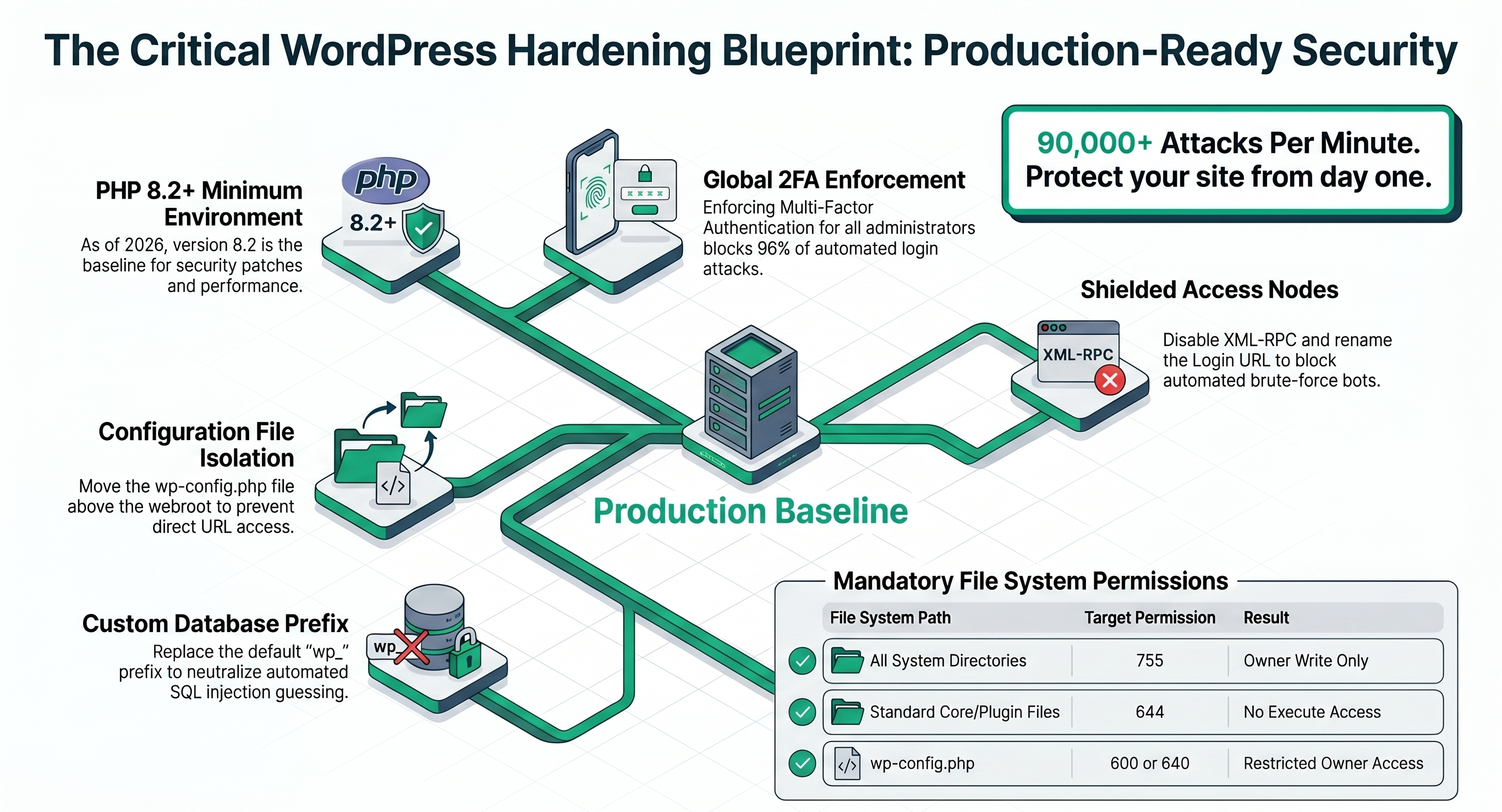
 [ Cloudflare Free WAF ] ──► [ Really Simple SSL ] ──► [ Wordfence Free ] ──► [ WP Hide Login ]
        ↓                            ↓                         ↓                      ↓
  Edge DDoS blocking           Force HTTPS               Firewall + malware     Custom login URL
  Bot filtering                HSTS headers              File integrity scan    Brute-force block
IP reputation SSL automation Login rate limiting 2FA enforcement| Plugin | Cost | Purpose |
|---|---|---|
| Wordfence Security | Free | Real-time firewall, malware scanner, login protection, 2FA |
| Really Simple SSL | Free | One-click HTTPS enforcement, HSTS header configuration |
| WPS Hide Login | Free | Renames /wp-login.php to a custom URL — blocks automated bots |
| Cloudflare | Free tier | Edge WAF, DDoS mitigation, bot scoring, IP reputation |
| Limit Login Attempts Reloaded | Free | IP-based lockout after failed login attempts |
2.2 `wp-config.php` Security Keys
WordPress security keys must be unique, complex, and refreshed annually. Generate via the official API:
// wp-config.php — regenerate at: https://api.wordpress.org/secret-key/1.1/salt/
define('AUTH_KEY',         'unique-random-string-here');
define('SECURE_AUTH_KEY',  'unique-random-string-here');
define('LOGGED_IN_KEY',    'unique-random-string-here');
define('NONCE_KEY',        'unique-random-string-here');
define('AUTH_SALT',        'unique-random-string-here');
define('SECURE_AUTH_SALT', 'unique-random-string-here');
define('LOGGED_IN_SALT',   'unique-random-string-here');
define('NONCE_SALT',       'unique-random-string-here');
2.3 Essential `wp-config.php` Hardening
// Disable file editing from WordPress admin panel
define('DISALLOW_FILE_EDIT', true);

// Disable plugin/theme installation from admin (production sites)
// ⚠️ NOTE: This also blocks admin-panel updates. When set, all plugin/theme
// updates must be performed via WP-CLI: `wp plugin update --all`
define('DISALLOW_FILE_MODS', true);

// Force SSL for admin and logins
define('FORCE_SSL_ADMIN', true);

// Limit post revisions to prevent database bloat
define('WP_POST_REVISIONS', 5);

// Production: disable debug display, but log to file for incident response
// WP_DEBUG must be false in production (never expose errors to visitors)
// WP_DEBUG_LOG: set to true so errors are written to /wp-content/debug.log
// Access the log via SSH/FTP during incident triage — never expose it publicly
define('WP_DEBUG',         false);
define('WP_DEBUG_LOG',     true);   // ← Writes to /wp-content/debug.log
define('WP_DEBUG_DISPLAY', false);  // ← Never show errors on-screen
> Protect the debug log – Method 1 (recommended): Move log outside webroot > php > // wp-config.php > define('WP_DEBUG_LOG', '/path/outside/public_html/debug.log'); > > > Method 2 (if method 1 is not possible): Target only the log file > apache > # Inside /wp-content/.htaccess (create if missing) > <Files "debug.log"> > Require all denied > </Files> > > Never put deny from all alone in /wp-content/.htaccess – it blocks all uploads, media, and theme/plugin CSS/JS assets.
2.4 HTTP Security Headers
Security headers protect against XSS, clickjacking, and data leakage at zero cost — via .htaccess (Apache) or Cloudflare Transform Rules (all hosts).
Via .htaccess (Apache/LiteSpeed):
<IfModule mod_headers.c>
  # Prevent clickjacking — disallows iframe embedding from other domains
  Header set X-Frame-Options "SAMEORIGIN"

  # Stop MIME-type sniffing — prevents browsers executing wrong content types
  Header set X-Content-Type-Options "nosniff"

  # Control referrer data sent to external sites
  Header set Referrer-Policy "strict-origin-when-cross-origin"

  # CSP baseline — adjust script-src if using inline scripts or third-party tools
  Header set Content-Security-Policy "default-src 'self'; script-src 'self' 'unsafe-inline' https://challenges.cloudflare.com; frame-src 'self' https://www.youtube.com; img-src 'self' data: https:; style-src 'self' 'unsafe-inline' https://fonts.googleapis.com; font-src 'self' https://fonts.gstatic.com"

  # Force HTTPS for 1 year (only add includeSubDomains if all subdomains use HTTPS)
  Header set Strict-Transport-Security "max-age=31536000"
</IfModule>
> ⚠️ CSP & Inline Scripts: The baseline CSP above includes 'unsafe-inline' for scripts and styles to maintain maximum compatibility with standard plugins and themes. For enhanced security, replace 'unsafe-inline' with a secure nonce or hash — however, this requires theme/plugin code modifications. The provided CSP is a safe baseline for most WordPress sites.
Via Cloudflare Transform Rules (no server access needed):
- Cloudflare Dashboard → Rules → Transform Rules → Modify Response Header
- Add each header as a
Setaction with the values above - Applies to all traffic before it reaches origin — works on any host
> Test headers at securityheaders.com — target A or A+ grade.
2.5 Two-Factor Authentication (2FA)
Wordfence Security (free) includes TOTP-based 2FA. It is one of the most effective security measures available — and it is free.
Enable 2FA in Wordfence:
- Wordfence → Login Security → Two-Factor Authentication
- Scan the QR code with Google Authenticator, Authy, or any TOTP app
- Save the recovery codes in a secure location (password manager)
- Enable: Force 2FA for all administrators — no exceptions
> Enforcement: In Wordfence → Login Security → Settings, set "Require 2FA for all user roles" to include Administrator and Editor roles at minimum. This locks out any administrator or editor login that has not configured 2FA, securing the site against automated password attacks.
3. Performance Stack
3.1 Core Web Vitals Targets
> ⚡ Core Web Vitals Optimization Guide: The blueprint below maps critical speed targets to their corresponding zero-cost optimization tools. > > 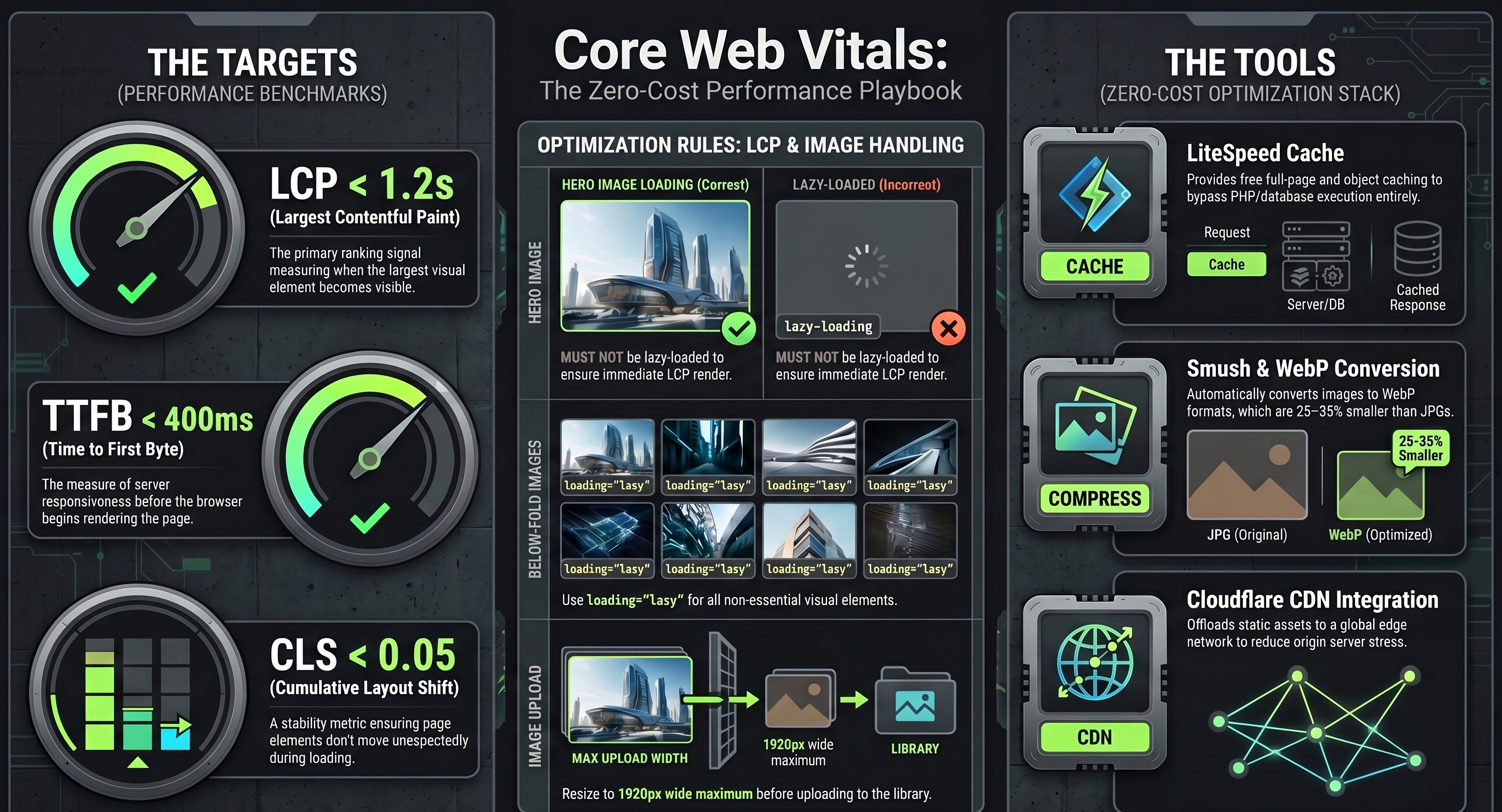
| Metric | Target | Hard Limit | Impact |
|---|---|---|---|
| LCP (Largest Contentful Paint) | < 1.5s | < 2.5s | Google ranking signal |
| CLS (Cumulative Layout Shift) | < 0.05 | < 0.1 | User experience |
| INP (Interaction to Next Paint) | < 100ms | < 200ms | Perceived responsiveness |
| TTFB (Time to First Byte) | < 400ms | < 600ms | Server response speed |
| FCP (First Contentful Paint) | < 1.2s | < 1.8s | Perceived load speed |
3.2 The Zero-Cost Performance Stack
 [ LiteSpeed Cache ] ──► [ Smush Image Optimizer ] ──► [ Cloudflare CDN ] ──► [ WP-Optimize ]
       ↓                          ↓                           ↓                      ↓
  Page + object cache       Auto WebP conversion         Global edge cache      DB cleanup
  CSS/JS minification       Lazy load images             Static asset TTL       Transient purge
Critical CSS inlining Resize on upload Browser caching Revision cleanup| Plugin | Cost | Purpose |
|---|---|---|
| LiteSpeed Cache | Free | Full-page cache, object cache, CSS/JS minification, lazy load |
| Smush | Free (up to 50 images/batch) | Lossless image compression, WebP conversion, lazy loading |
| WP-Optimize | Free | Database cleanup, cache, image optimization combined |
| Cloudflare | Free tier | Global CDN, static asset caching, TTFB reduction |
| Autoptimize | Free | CSS/JS concatenation and minification (if not using LiteSpeed) |
> Hosting matters more than plugins. LiteSpeed Cache only works optimally on LiteSpeed servers. On Apache/Nginx, use W3 Total Cache or WP Rocket (₹2,500/yr) instead.
3.3 Image Optimization Rules
- Upload format: Always upload JPG for photos, PNG for graphics with transparency, SVG for icons.
- Max upload dimensions: Resize before upload — 1920px wide maximum for full-width images.
- WebP conversion: Enable in Smush or LiteSpeed Cache — WebP is 25–35% smaller than JPG.
- Lazy loading: All below-fold images must have
loading="lazy"— enabled globally in Settings → Media in WP 5.5+. - Hero image: The hero/banner image must NOT be lazy-loaded — it is the LCP element.
4. Backup Architecture
4.1 The 3-2-1 Backup Rule
3 copies of data
  ├── 2 on different storage media (server + cloud)
  └── 1 offsite (Google Drive, OneDrive, or AWS S3)
UpdraftPlus Free satisfies this entirely at zero cost:
| Backup Component | UpdraftPlus Free Configuration |
|---|---|
| Files backup | Themes, plugins, uploads, wp-content |
| Database backup | Full MySQL dump including all tables |
| Remote storage | Google Drive (free 15GB) or OneDrive (free 5GB) |
| Schedule | Daily database + weekly full files |
| Retention | Keep last 4 backups (30-day coverage) |
4.2 Pre-Update Snapshot Protocol
Before every WordPress core, theme, or plugin update:
# Manual backup via UpdraftPlus before any update
Dashboard → UpdraftPlus → "Backup Now" → Include database + files
# Wait for completion + verify remote storage upload before proceeding
4.3 Recovery Time Objectives
| Failure Scenario | Recovery Method | Target RTO |
|---|---|---|
| Plugin regression | UpdraftPlus restore (partial) | < 30 minutes |
| Theme corruption | Theme file restore from backup | < 15 minutes |
| Full site failure | Complete UpdraftPlus restore | < 2 hours |
| Database corruption | Database-only restore | < 45 minutes |
5. SEO Foundations
5.1 Rank Math Free — The Complete SEO Stack
Rank Math (free) replaces Yoast, Yoast Premium, Schema Pro, and Redirection plugin in a single install:
| Feature | Rank Math Free |
|---|---|
| On-page SEO analysis | Per post/page with scoring |
| XML Sitemap | Auto-generated, submitted to Google |
| Schema markup | Article, FAQ, HowTo, LocalBusiness, Person |
| 301/302 Redirects | Built-in redirect manager |
| Open Graph + Twitter Card | Full social preview control |
| Robots.txt editor | In-dashboard editing |
| Google Search Console | Direct integration |
| WooCommerce SEO | Product schema included |
5.2 Essential SEO Configuration Checklist
✅ Permalink structure: /%postname%/ (not /?p=123)
✅ XML sitemap submitted to Google Search Console
✅ robots.txt: Disallow /wp-admin/, /wp-login.php, /xmlrpc.php
✅ Each page has unique <title> and <meta description>
✅ One <h1> per page — heading hierarchy is logical
✅ All images have alt attributes
✅ Internal linking structure — no orphan pages
✅ Canonical URLs configured — prevents duplicate content penalties
✅ Core Web Vitals passing — Google uses as ranking signal
✅ Mobile-first design — Google indexes mobile version first
5.3 `robots.txt` Baseline Configuration
User-agent: *
Disallow: /wp-admin/
Disallow: /wp-login.php
Disallow: /xmlrpc.php
Disallow: /wp-includes/
Disallow: /?s=
Allow: /wp-admin/admin-ajax.php

Sitemap: https://yoursite.com/sitemap_index.xml